
Find Products Faster with Our Enhanced Search Experience
We've upgraded the Codex search experience to help you find products more quickly and accurately.
The new AI-powered Search is designed to understand what you're looking for, even when you don't enter an exact product code or product name.
What's New?
The new search can now:
- Match partial product codes and keywords
- Suggest products as you type
- Correct common spelling mistakes
- Show related products and alternatives
- Return more relevant results based on search intent
- Display personalised recommendations for logged-in customers
Why Do Search Results Look Different?
The new search engine focuses on relevance rather than exact matching alone.
For example, if you search for 47900, you'll still see that exact product in the results. However, you may also see related products from the same range if the search engine determines they are relevant to your query.
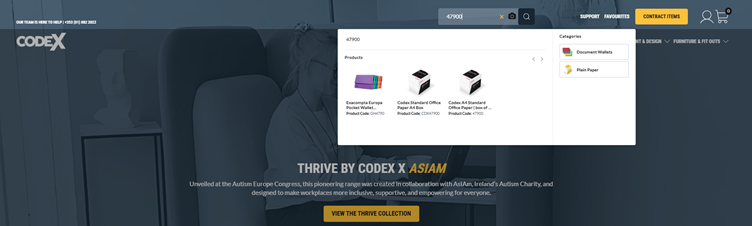
This helps customers discover alternatives and find products more efficiently.
Tips for Better Search Results
✅ Search by product code, keyword, or product description
✅ Use partial codes if you don't know the full item number
✅ Take advantage of autocomplete suggestions
✅ Check related products that may meet your requirements
Logged-In vs Logged-Out Experience
Search results may vary depending on whether you're logged into your account.
Logged-in customers can benefit from personalised search experiences that may include:
- Recently viewed products
- Previous purchases
- Recent searches
This helps surface products that are most relevant to your business.
